Escalations that keep going, notification rules and a public API
Our first week after Spectate 2: escalation paths that page the next person or the whole team, your own notification rules, a public REST API, the Discord app and health checks for servers.
Spectate 2 went live last Sunday. Most of what you asked for in the first days was about one moment: a page goes out and nobody answers. This week we fixed that, and shipped a few things we had lined up. The big things come first, the smaller changes and fixes after.
Escalations that don't give up
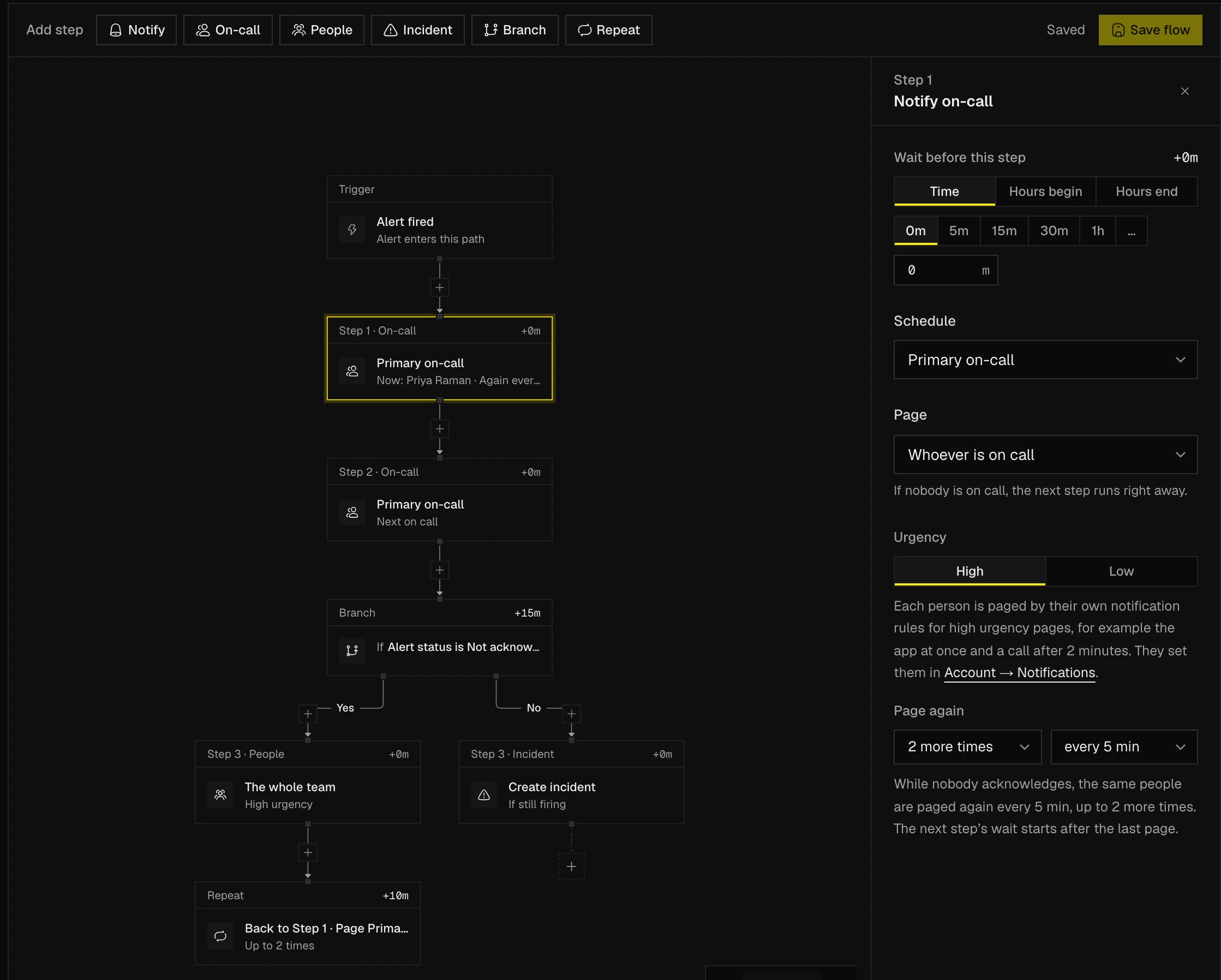
Until now, an escalation path paged whoever was on call and then moved on. Now a paging step can page whoever is on call next, everyone on the schedule, one rotation, the members you pick or the whole team. If nobody acknowledges, the step pages the same people again every few minutes. A Repeat step goes back to an earlier step, up to 10 times.
Branches can wait and look at the alert itself. One branch can wait 30 minutes, check whether the alert is still not acknowledged, and page your team lead if it is. In the editor, the + on every connection adds a step between two others, and Move up and Move down change the order. The escalation paths guide has examples.
Your own notification rules
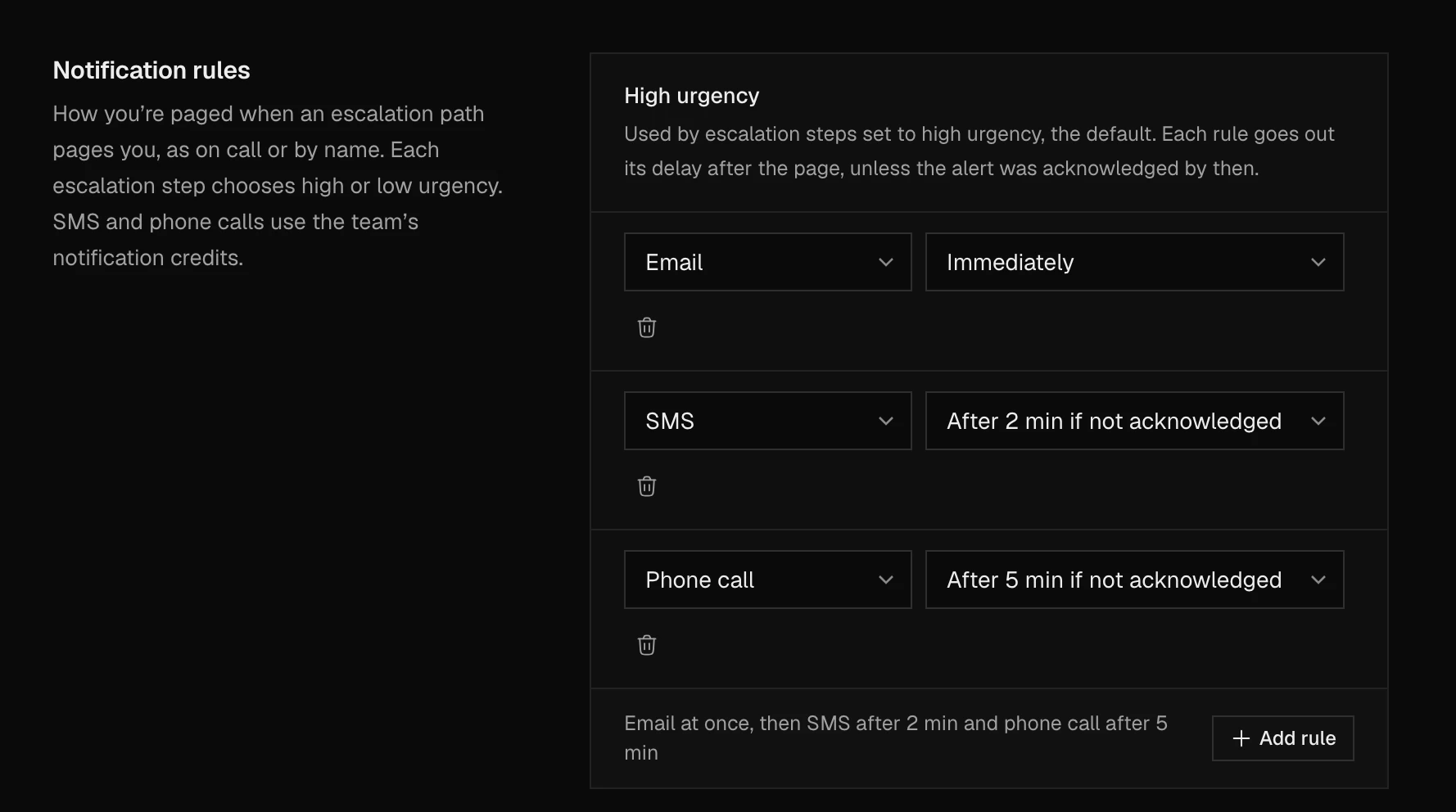
Everyone on call now decides how Spectate reaches them. A rule is a method and a time. Slack right away, an SMS after 2 minutes, a phone call after 5 if nobody has acknowledged yet. When someone acknowledges, Spectate drops the texts and calls that haven't gone out, so they cost no credits.
You get two lists. High urgency is for alerts that should wake you, low urgency for the rest, and each paging step picks one. Set yours up in Account → Notifications and send yourself a test while you're there. If you don't, nothing changes for you. Spectate keeps paging you by every method at once, as before. See notification rules.
A public API, and an MCP server
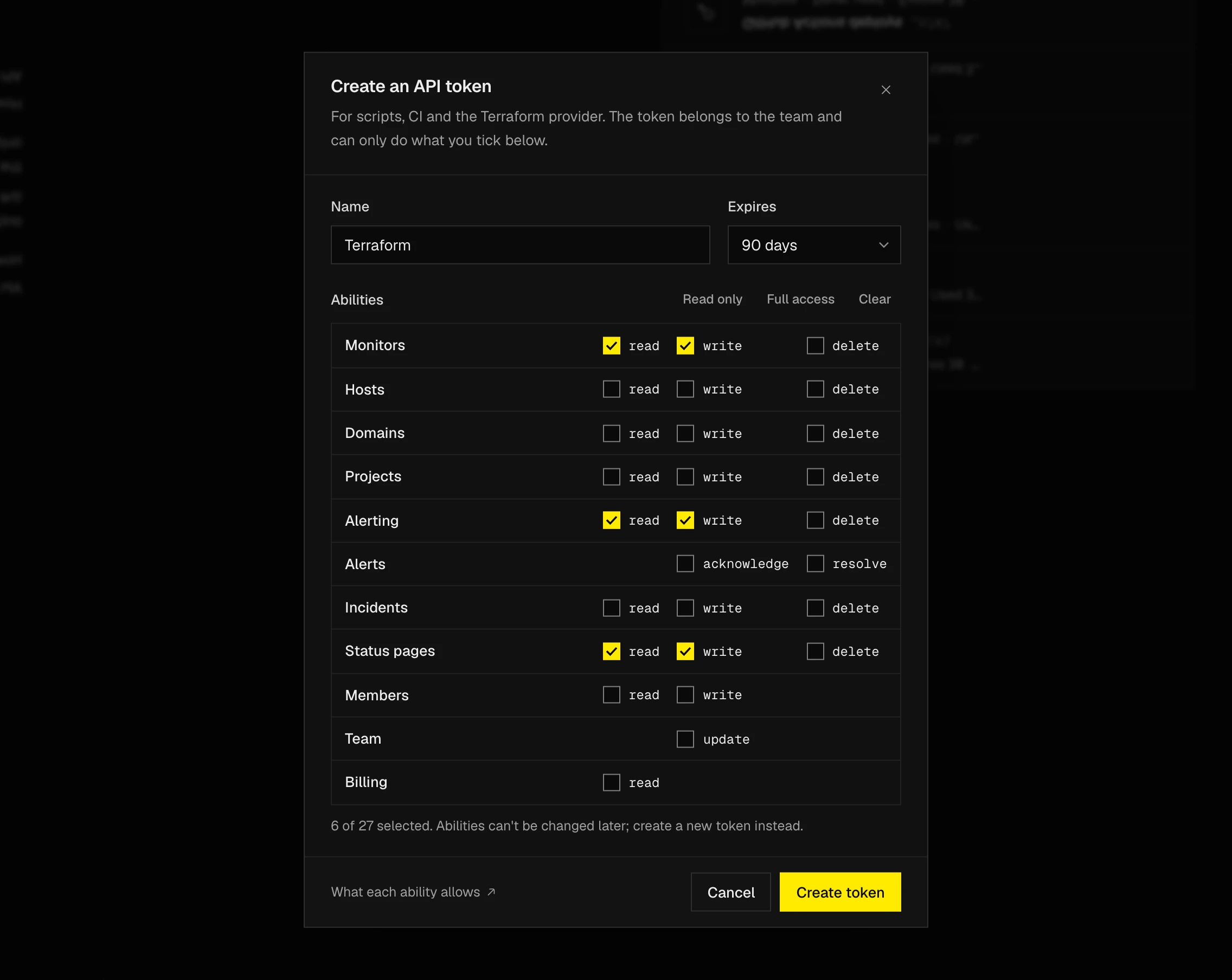
Spectate has a public REST API. Create a token in Team → API tokens, give it only the abilities it needs, and manage monitors, hosts, domains, alerting, on-call, incidents, status pages and members from scripts and CI. The API reference lists every endpoint and comes from an OpenAPI 3.1 document, so you can generate a client from it.
If you'd rather ask than script, the MCP server connects Claude, ChatGPT, Cursor, VS Code or Codex to your team. You sign in with OAuth and the assistant works with your own role. Ask what's going on, acknowledge an alert, or have it post a status page update after you approve the text.
Discord gets the Slack app's features
The new Discord app does what the Slack app does. Alerts arrive with Acknowledge, Declare incident and Resolve buttons and update in place. /spectate declares and runs incidents, each in its own channel with a pinned header. You can publish to your status page and ask someone to cover your shift without leaving Discord. On-call pages and shift reminders come as a DM, and an on-call role always holds whoever is on call. Webhook channels keep working if you don't want the app.
Slack got more on-call too. Pages arrive as a DM, shift reminders have a Request cover button, and a user group follows each schedule. React with 📌 to put a message on the incident timeline, and Spectate nudges an incident channel that has gone quiet.
Health checks for your servers
Agent 2.1 adds seven health checks: failed systemd services, processes killed for lack of memory, pending security updates, a reboot that's due, a clock that isn't synchronised, file handles running out, and stalls on memory or I/O. Each check can fire its own alert, and the hosts list has a Needs attention filter. Run sudo spectate-agent update to get it. The thresholds are in health checks.
Improvements and fixes
- Response times from every region. On Team and Business, the other three regions can time a monitor too, and its Performance page compares them in one chart.
- Waterfalls for single checks. Click a point on the response time chart to see the checks behind it. SMTP, IMAP, POP3 and TCP monitors now get a waterfall of their handshake.
- Fewer false failures. A failed check whose recheck passes no longer counts as downtime.
- Resolve alerts by hand. And delete resolved alerts and incidents you no longer need.
- Public write-ups. Explain an outage on your status page, starting from the internal postmortem, and email it to subscribers if you like.
- Status page incidents from Slack.
/spectate status-pagestarts or updates one without a Spectate incident. - Plan upgrades apply at once. You see the prorated charge and confirm it first.
- New docs at docs.spectate.net, rewritten for Spectate 2.
- Fixed false "DNSSEC keys changed" alerts on signed domains.
- Fixed monitors from the old platform that were checked far more often than their interval.
- Fixed alerts of a deleted monitor that no longer opened.
- Fixed the CPU core count of hosts on agent 2.x.
Thanks to everyone who moved to Spectate 2 this week and told us what was missing. Keep it coming at help@spectate.net or on our Discord. Next up is the Spectate app for iOS and Android.